
Every application in one place.
A free job search manager for your desktop. Your applications, resumes, cover letters, interviews, contacts and offers live together, and Seisin shows you what's working. It runs on your own computer, with no account to make.
Seisin, from first application to final offer.
-
Applications
Every role you apply to, in one list.
Each role keeps its status, location, salary, work type and notes, all in one list you can filter and sort. Roles you haven't applied to yet sit in Planned, with their closing dates in view.
- Find a role
- Log it with its closing date
- One click marks it applied
- Rounds, notes and the offer attach to it
Show in-app viewApplications
Pick one to open its record
- PlannedCloses in 3 days
- InterviewRound 3 on 06/10
- AppliedWaiting 6d
- AssessmentReplied in 4d
Thornwick Labs
- Status
- Planned
- Closing date
- 04/10, in 3 days
- Source
- Company website
- Resume
- Not chosen yet
-
every application feeds the analysis
Analytics
See what's working.
Reply rates by source, your weekly pace, pipeline health and the full funnel, all worked out from what you've already logged, plus a map of every country you've applied in. It's the part that tells you what to change next week.
Show in-app viewReplies by source
58% 55 of 95 applications got a replyApplied95Interview20Offer6Across every source, a little over half your applications get a reply. Pick one to see how it compares.
-
each application keeps the resume you sent
Documents
Documents that remember where they went.
Import a resume from PDF or Word, choose from five templates and run an offline readability check. Write cover letters paragraph by paragraph, in your own words, with nothing generated for you. Each application keeps a note of the version you sent.
Show in-app viewWhat went out with each application
Resumes
- Backend resume, v2
- Backend resume, v1
- Frontend resume
Cover letters
- Hollowmere Systems
- Nimbus Data
- Cindermoor Labs
Hollowmere got the second backend resume and the letter written for them on 12/09.
-
the rounds that follow
Interview Suite
Ready for every round.
Log each round, the recruiter you spoke to and your research notes, keep a question bank, and build STAR answers. A prep checklist covers the round ahead, and every interview, follow-up and deadline goes on one calendar you can export to Google or Outlook.
Show in-app viewPrep for the next round
2 of 5 done -
the people you meet along the way
Network
Know who you know.
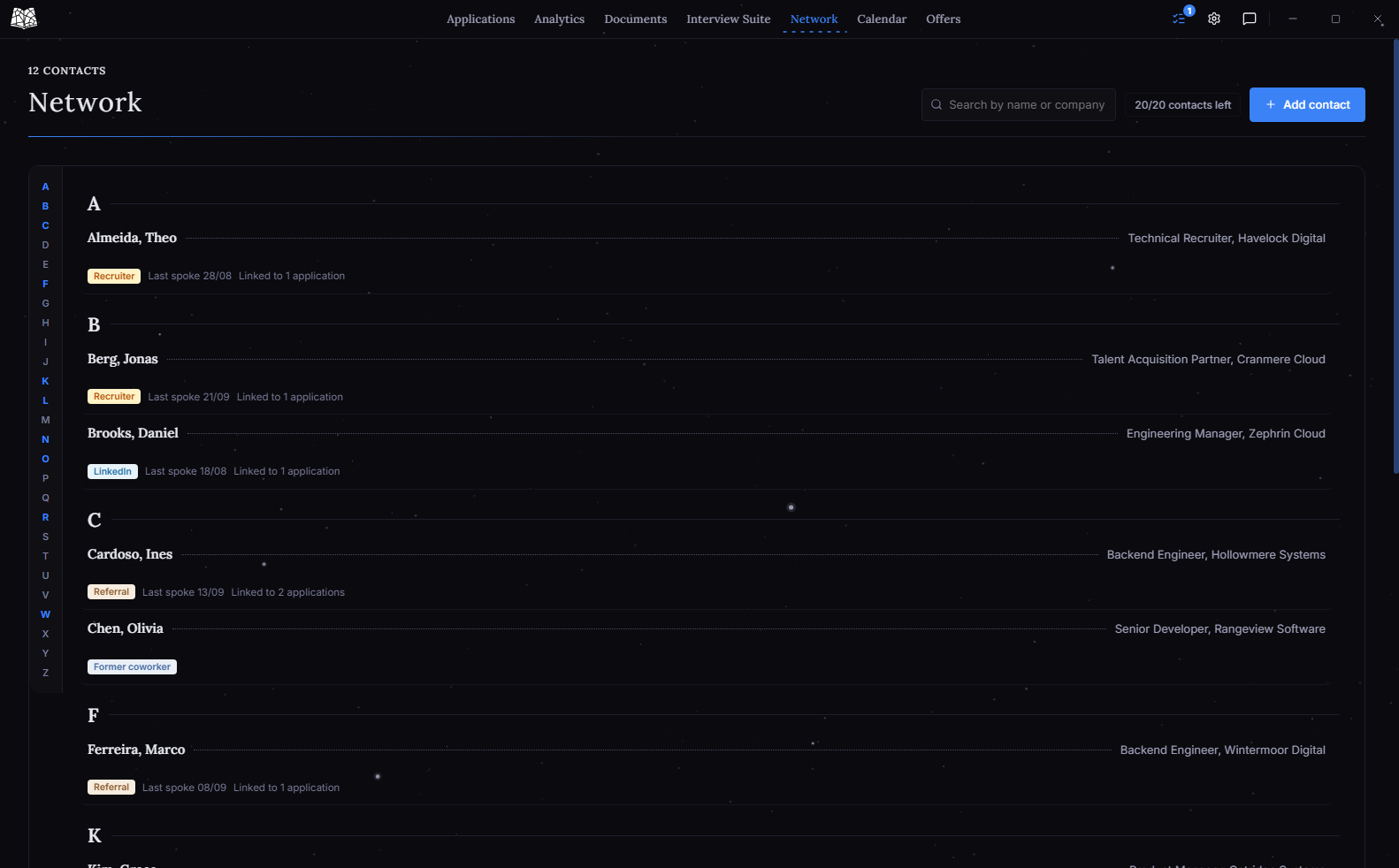
Keep recruiters, referrals and everyone else you meet in one list. Seisin points them out when it matters: when you add an application at their company, or start a cover letter to it.
Show in-app viewAdding an application at
You know someone here
Ines Cardoso
Backend engineer, met through a referral
01/09 Said to reach out if I ever applied there too.
-
and, if it comes, the offer
Offers
Compare what you were offered.
Record each offer exactly as it was made, then compare them side by side, with salaries converted to one currency, relocation costs counted and every decision deadline on your calendar.
Show in-app viewComparing two offers, in euros
Hollowmere Systems
Lisbon, no relocation
€58,000
Offered €58,000 a year
Cindermoor Labs
London, relocation needed
€57,180
Offered £54,000, about €63,180
With the move counted, Hollowmere comes out ahead by €820.



Patterns in your search
See which applications get replies.
The funnel
In this example, referrals get a reply three times out of four, and every job board sits around half. That gap is a good hint about where to spend next week.
Your weekly pace, pipeline health and conversion funnel come straight from the applications you've logged, so there's nothing to set up. How the analytics work
Guides to each feature
A guide for every part of the app.
- Job search analyticsWhat the numbers mean and what to do about them
- Interview prepRounds, the question bank and STAR answers
- Resume builderTemplates, imports and the readability check
- Cover letters and NetworkWrite your own letter, with the people you know beside it
- Internship trackerRunning a season of applications with closing dates
On your machine
Everything.
- Applications and their history
- Interview notes and answers
- Resumes and cover letters
- Contacts and offers
Sent to us
Nothing.
Seisin has no account and no cloud copy, and your applications, documents and notes never leave your computer. A few features make optional checks online: the update check, reading a job post from its link, exchange rates, and an anonymous daily count of which version is in use. All of them can be avoided, and none of them sends us anything from your search.
Read the privacy noticeFrequently asked questions
What people ask first.
A spreadsheet works for a list of applications. Once you're also tracking interview rounds, prep notes, resume versions and competing offers, keeping it all in one sheet becomes a project of its own. Seisin keeps the application, the interview prep, the resume you sent and the offer you got on one record, and works out the analysis for you, with no formulas.
They're web apps: you sign up for an account, your data lives on their servers, and many of the useful features sit behind a monthly plan.
Seisin runs on your own computer with no login. The free browser extension saves postings from any job board, with no limit, and the analytics are part of the free app.
Not yet. Everything on this page is free to use today, including the tracker, your full history and the analytics.
A premium version is planned for later this year. It's meant to add more on top of the free app, at a price that works for someone in the middle of a job search.
The free plan does have a few limits. Exporting a resume is 10/month, exporting a cover letter is 3/week, and adding new contacts to Network is 20 in your first 30 days, then 5/month, all of which reset on a schedule. Each contact can also be linked to one application at a time. There are no limits on saving, editing or viewing, and reaching a limit doesn't remove anything you've already made. Settings shows what's left and when each limit resets.
In a local database on your own machine, created during setup. Nothing from your job search is uploaded, and there's no account to create or lose access to.
Seisin can also send an anonymous daily count of which version is in use. It is off unless you turn it on, and it never includes anything from your job search.
Yes. Settings lets you export everything to CSV or Excel, or save a full backup, at any time.
Windows, macOS on Apple Silicon, and Linux as either a .deb package or an AppImage.
The installers aren't code-signed yet, so Windows SmartScreen and macOS Gatekeeper flag them by default. Each download page has the exact steps to get past it. It's a one-time thing per install.
Who makes Seisin
I'm Abdelrahman, a Data Science & Management student at Universidade Europeia in Lisbon. I've built every release since the first one in July 2026, and messages to support@getseisin.com come straight to me.
Seisin carries no advertising and has no commercial relationship with any employer or recruiter. The core of it is free to use.
Abdelrahman Sheibani, more about the project
Download
Each download page shows how to install Seisin.